User rights configuration
Roles
User roles define the rights to use LBS functions.
Salesperson
A salesperson is assigned to a client record or to a contact record (named sales manager in the record).
A salesperson has access to all its client and contact records but has no access to the clients and contacts records of other salespersons within the company.
Salespersons are displayed in dropdown lists « Salesperson » and « Sales Manager » in client records, contact persons, quotes, orders, etc.
Sales supervisor
The sales supervisor has access to all clients and contacts records.
Developer
The developer box is mainly for statistics needs. In a contact record, it is related to the « To develop » box and is therefore used to follow development activities of the users with commercial roles.
Note: to select “Sales supervisor” and “Developer” boxes, the Salesperson box must be ticked first.
Account Manager
The account manager is assigned in a client record and has access to all clients and contacts records, except if he/she has also a “salesperson” role, which has only access to their own clients and contacts.
Users with the account manager role are displayed in the account manager dropdown lists in client records, quotes, orders, etc.
Project manager
The project manager is assigned to a client record and to quotes and orders (where there can be more than one project manager assigned). A project manager has access to all clients and contacts records, even though they are not the main project manager for this client, except if they also have the “salesperson” role, which has only access to their own clients and contacts.
Users with project manager role are displayed in the project managers dropdown lists of quotes and orders.
Advanced access rights
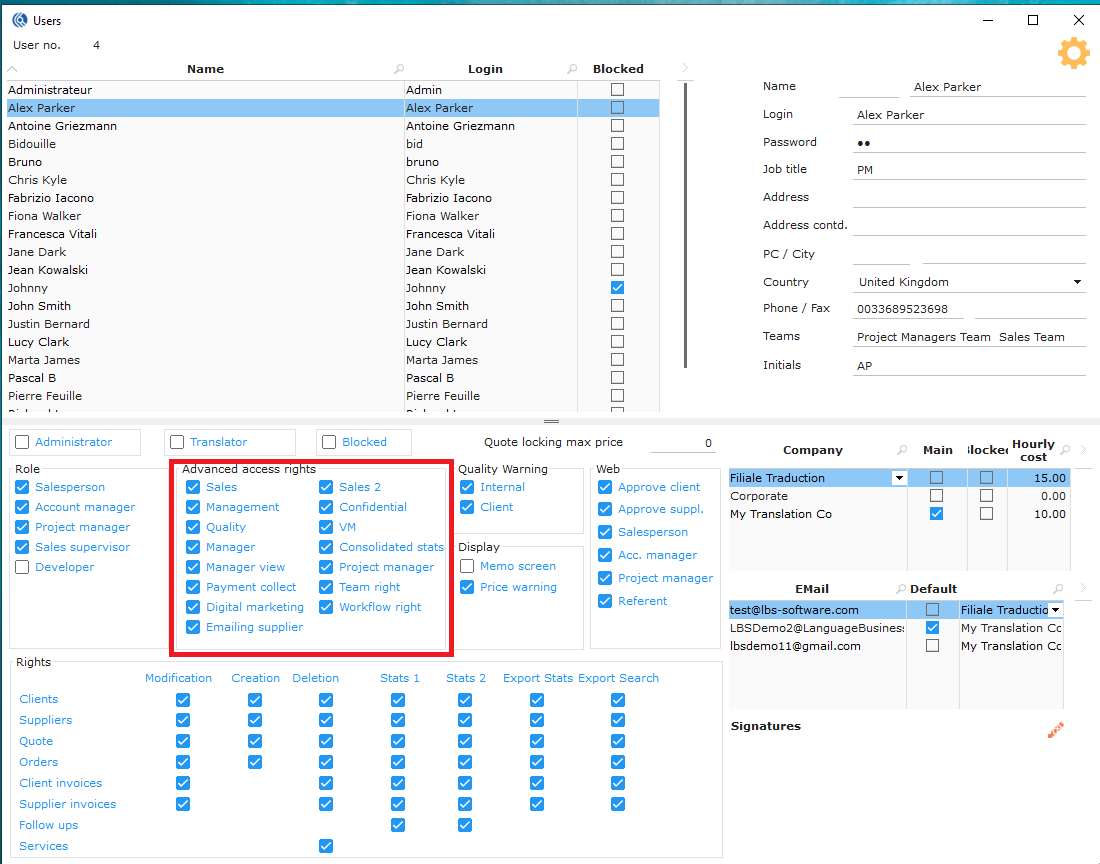
Sales
This right allows the user to:
- Change the salesperson, account manager and project manager on a client record.
- Change the sales manager of a contact.
- Change the date of a quote.
- Create groups of services to import into a quote.
- Import contacts from an external file.
- Manage duplicates in client records.
- Create client groups.
- Create CAT rates for selected clients.
- Create special prices for selected clients.
- Add Web referent users for several contacts at once.
Management
This right allows the user to:
- Unlock locked invoices and credit notes.
- Delete a validated order.
- Delete a validated invoice.
- Delete a validated credit note.
- Delete a validated payment or group of payments.
- Access the Clean menu in the dashboard.
- Change the date of the end of a service.
- Create credit notes on a client account.
- Change the “Initial sales manager” in a contact record.
Quality
This right allows the user to:
- Validate client quality feedback.
- Delete client quality feedback.
- Access quality statistics.
- Configure satisfaction surveys.
- Schedule satisfaction surveys.
Manager
This right allows the user to:
- Manage the absences of different users (data entry, consultation). By default, the user can only see and access his own absences.
- Manage saved searches: create searches shared with other users, manage rights to searches already created.
- See the details of management costs in quotes and orders for each user.
- Access management statistics (breakdown of management costs for each user).
- Edit the supplier service in the quote (also accessible to PMs who don’t have the manager access)
- Access objectives and commissions.
- Create and modify clients rates by bulk (for more than 2 clients at the same time).
Manager View
This right allows the user to:
- Access the Manager View in the dashboard where you can configure general statistics.
- See the web contact passwords.
Payment collection
Paid module
Ticking this box to see the Payment collection view.
Digital marketing
Paid Module
Tick this box to see the Digital Marketing view.
Emailing supplier
Paid Module
Tick this box to see the Emailing supplier view.
Sales 2
This right allows the user to:
- Validate quotes where the total is higher than the maximum validation price configured.
- Change prices in the client record.
Confidential
This will allow the salesperson to view his confidential client record, quotes and orders.
The Sales supervisor with confidential right will be able to see all confidential client records, quotes and orders.
VM
This right allows the user to:
- Block and unblock a supplier record.
- Create new keywords from supplier records.
- Create rates in the supplier records.
- Create CAT grids for selected suppliers.
- Create special prices for selected suppliers.
Consolidated stats
This right provides access to the consolidated statistics (all companies) for orders, quotes, clients, client invoices and management in general. You need to have rights on stats 1 and/or 2.
See below: Rights on Stats right 1 and 2.
Project Manager
This right allows the user to:
-
Create additional services in an invoiced order. These services will not be invoiceable to the client.
-
Select multiple lines and delete them at the same time, in orders and quotes.
It is not possible to delete multiple lines without this right, the user will have to delete line by line. This is meant to limit deletion mistakes. Once deleted, it is not possible to undo.
Team right
Team right allows the user to see the team’s performances in statistical widgets (in the sales view).
Workflow right
This right allows the user to:
- Save a workflow from a quote or an order.
- Delete a workflow.
- Rename a workflow.
Quality warning, Web & Display
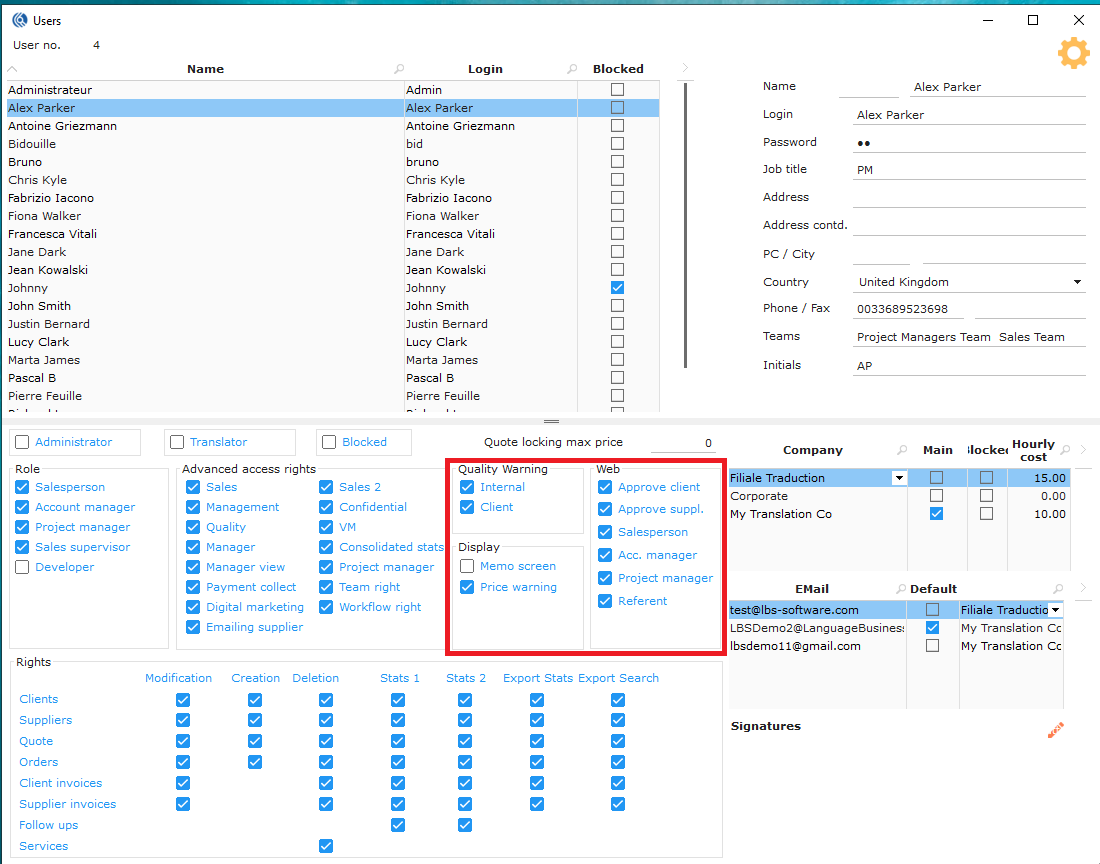
Quality warning
Internal
Tick this box so that the user receives a quality warning email after an internal supplier assessment if the result is less than or equal to a threshold entered in the supplier assessment configuration.
Client
Tick this box so that the user receives a quality warning email after client quality feedback if the result is less than or equal to a threshold entered in the client quality feedback configuration.
Display
Memo screen
Tick this box so that the client information window will open every time you open a quote, order and client invoice for the first time. It allows users to read important information concerning the client before processing quotes, orders and invoices. This window is also accessible manually if not displayed automatically.
Price warning
Tick this box so that the client price will be displayed in red if it doesn’t reach your target margin.
Web
Approve client
This right allows the user to:
- Receive notifications when a new client registers.
- Validate clients who registered directly via the client website.
- Receive notifications for every change made on the portal by the client.
Approve supplier
This right allows the user to:
- Receive notifications when a new supplier registers.
- Validate suppliers who registered directly via the supplier website.
- Receive notifications for every change made on the portal by the supplier.
Salesperson
Only one user by company
Tick this box so that the user is automatically registered as a Salesperson in the client records created on the web. Then this user will:
- appear in their contact list by default.
- receive quote requests from these new clients.
Account Manager
Only one user by company
Tick this box so that the user is automatically registered as a Sales Manager in the client records created on the web. Then this user will:
- appear in their contact list by default.
- receive quote requests from these new clients.
Project Manager
Only one user by company
Thick this box so that the user is automatically registered as Project Manager in the client records created on the web. Then this user will:
- appear in their contact list by default.
- receive quote requests from these new clients.
Referent
Only one user by company
Tick this box so that the user is automatically registered as Referent in the client records created on the web. Then this user will:
- appear in their contact list by default.
- receive quote requests from these new clients.
Rights
More rights can be given to each user after giving them the advanced access rights:
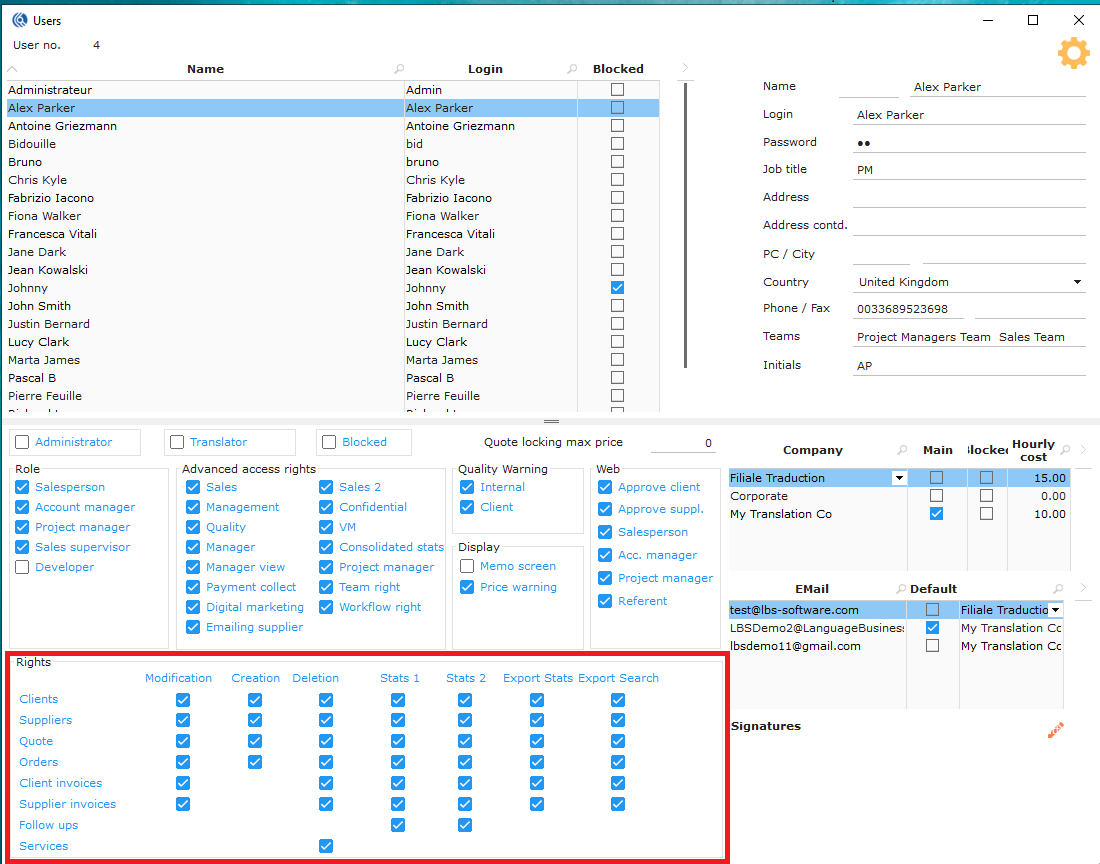
Modification
Tick the modification rights for your users. Allow them to modify Clients’ record, Suppliers’ records, Quotes, Orders, Client invoices, and/or Supplier invoices.
Creation
Tick the creation rights for your users. Allow them to create Clients’ record, Suppliers’ records, Quotes, Orders.
Deletion
Tick the deletion rights for your users. Allow them to delete Clients’ record, Suppliers’ records, Quotes, Orders, Client invoices, Supplier invoices and/or Follow-ups.
NB: Service deletion right allows users to delete a service when the status is “to be processed” or above.
Stats 1
“Stats 1 – Clients” will allow the following statistics**
- Client orders:
- TO/evolution/Client
- Management and Development TO Evolution/Client
- TO Evolution/Business
- TO Evolution/Sector
- TO Evolution/Salesperson
- TO Evolution/Business/Salesperson
- TO Evolution/Sector/Salesperson
- TO Evolution/Sales manager
- TO Evolution/Pole/Sales manager
- TO Evolution/Business/Sales manager
- Client invoices:
- TO Evolution/Client
- TP Evolution Management and Development/Client
- TO Evolution/Business
- TO/Financial year
- TO/Detailed financial year
- TO Evolution /Salesperson
- TO Evolution/Business/Salesperson
“Stats 1 – Suppliers” will allow the following statistics
- Inactive suppliers
- Suppliers without software
- Supplier without services
- Suppliers with software list
- Blocked suppliers
- Number suppliers/Service and languages
- Supplier number/Service and topic
- Supplier number/Topic and service
- Supplier number/Style and service
- Offers number/Supplier
“Stats 1 – Quotes” will allow the following statistics
- Tasks/person/qualification
- Breakdown/Salesperson (consolidated stats available)
- Breakdown/Sales and Qualification (consolidated stats available)
- Breakdown/SM (consolidated stats available)
- Breakdown/SM and Qualification (consolidated stats available)
- Reactivity/Salesperson
- Lost quotes/Salesperson/Reason
- Lost quotes/Project Manager/Reason
“Stats 1 – Orders” will allow following statistics
- TO/Margins/Period/Client (consolidated stats available if option ticked)
- TO/Margins after credit notes/Period/Client (consolidated stats available)
- TO/Margins after credit notes/Period
- Tasks/person/qualification
- TO/PM
- Breakdown/PM (consolidated stats available)
- Breakdown/PM and Qualification (consolidated stats available)
- Qualifications/PM
- TO and Margin per Project Manager and Services
- Breakdown/AM
- Breakdown/SM (consolidated stats available)
- Breakdown/SM and Qualification (consolidated stats available)
- TO Generated/Month Internal production
- TO and margin/Month Internal production
- TO and margin/Month External production
- TO and number of units/Period/Service and languages
- Qualifications/Salesperson
- TO/Margins after credit notes/Period/Salesperson
- Breakdown/Salesperson (consolidated stats available)
- Breakdown/Sales and Qualification (consolidated stats available)
- Mission TO by Software
“Stats 1 – Client invoices” will allow the following statistics
- no statistics at this level available for the moment
“Stats 1 – Supplier invoices” will allow the following statistics
- Cost/suppliers
“Stats 1 – Follow-ups” will allow the following statistics
- List follow-ups/Caller+level
- Follow ups on sites
- Follow-ups/Caller+salesperson
- Follow-ups/Level+caller
- Follow-ups/Business+level
- Follow-ups/Business+caller
- Follow-ups/Client+level
- Follow-ups/Client+caller
- Follow ups on contacts
- Follow-ups/Caller+salesperson
- Follow-ups/Level+caller
- Follow-ups/Business+level
- Follow-ups/Business+caller
- Follow-ups/Client+level
- Follow-ups/Client+caller
Stats 2
“Stats 2 – Clients” will allow “Stats 1 – clients” + following statistics
- Client business/Period (consolidated stats available)
- TO/SalespersonPeriod
- SM Activity
- Overall analysis
- TO/Activity
- TO/Sector
- Client list
- New clients
- Lost clients
- New contacts who placed an order
“Stats 2 – Suppliers” will allow “Stats 1 – Suppliers” + following statistics
- no additional stats for the moment
“Stats 2 – Quotes” will allow “Stats 1 – Quotes” + following statistics
- Analysis of quotes/sales rep
- Analysis of contact quotes/sales rep
- Analysis of client quotes/sales rep
“Stats 2 – Orders” will allow “Stats 1 – Orders” + following statistics
- Productivity/PM (consolidated stats available)
- Detailed productivity/PM
- Late delivery/PM
“Stats 2 – Client invoices” will allow “Stats 1 – Client invoices” + following statistics
- Cumulated TO generated/Salesperson (consolidated stats available)
- Cumulated TO generated/Salesperson detailed
- Cumulated TO generated/Salesperson/Period
- Consolidated stats: Cumulated TO
- Cumulated TO/Salesperson (consolidated stats available)
- Cumulated TO/Salesperson invoice details
- Development of turnover/Salesperson
- Breakdown/Salesperson (consolidated stats available)
- Breakdown/Sales manager (consolidated stats available)
- TO and margin/PM/Client/Month
- TO and Service margin/Client/Month
- TO and Client margin/Month
- Invoices/User
“Stats 2 – Supplier invoices” will allow “Stats 1 – Supplier invoices” + following statistics
- no additional stats for the moment
“Stats 2 – Follow-ups” will allow “Stats 1 – Follow-ups” + following statistics
- no additional stats for the moment
Export Stats
Allow the user to export above statistics on Clients, Suppliers, Quotes, Orders, Client Invoices, Supplier Invoices, and or Follow-ups. Only statistics rights given can be exported.
Export Search
Allow users to export their searches on Clients, Suppliers, Quotes, Orders, Client Invoices, Supplier Invoices, and or Follow-ups.